
For many small and mid-sized businesses, contract management still happens in Excel. At first glance, spreadsheets seem cost-effective and practical—but as contract volume grows, version confusion, missing updates, and manual errors start to pile up. Before long, “Which file was the latest version?” becomes a daily question, slowing down operations and creating compliance risks.
So how can businesses migrate from spreadsheets to a Contract Lifecycle Management (CLM) system without losing a single piece of data?
In this article, we’ll walk through the transition process and explore how two key contractSILO features — Scan with AI and Customisable Filtering — make this shift fast, accurate, and secure.
The Hidden Limits of Excel
Excel has served as the backbone of data management for decades. But when it comes to contracts, its limitations become obvious:
-
Version chaos: Multiple people editing the same sheet leads to data inconsistencies.
-
Access control issues: Once files are shared by email or cloud link, data security is compromised.
-
Tracking difficulties: Deadlines and renewals must be managed manually, increasing human error.
-
Search limitations: Finding specific clauses or obligations in rows and columns is inefficient.
Over time, your Excel file evolves from a “data source” into a data maze.
Scan with AI: Turn Static Files into Structured Data
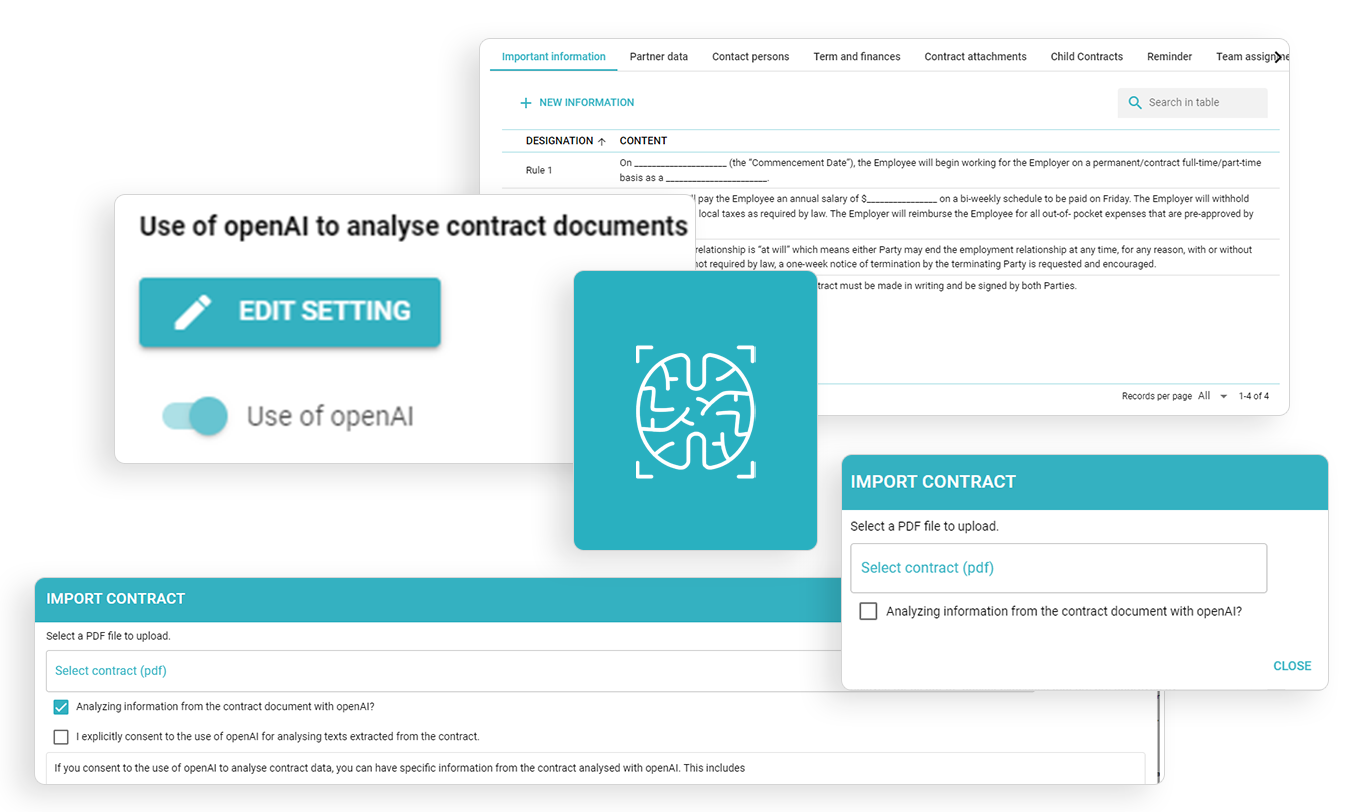
Scan with AI
Scan your documents with Open AI.Scan with AI and place common details automatically.
Available for all versions and possible to disable.
The biggest challenge during CLM migration is accurately transferring contract information from legacy files.
contractSILO’s Scan with AI feature automates this process, extracting key details from uploaded documents — such as contract parties, start and end dates, renewal terms, and payment amounts — and mapping them to structured CLM fields.
Instead of manually re-entering hundreds of rows, your existing contracts are read, understood, and categorized automatically.
Benefits include:
-
Eliminates human error from manual data entry.
-
Detects missing or inconsistent information.
-
Processes large contract archives within minutes.
This intelligent scanning engine acts as a migration assistant for businesses that need a clean, complete transition from spreadsheets to digital management.
Data Cleaning and Standardization
Before importing any data, it’s critical to clean and normalize your records.
Different Excel files often contain inconsistent headers, date formats, or terminology — one sheet might label a column “Start Date,” another might use “Contract Begin.”
contractSILO automatically aligns these variations during the AI scanning process, creating a standardized data model.
This ensures accurate filtering, searching, and reporting later on — a key advantage over static spreadsheets.
Customisable Filtering: See What Matters Most
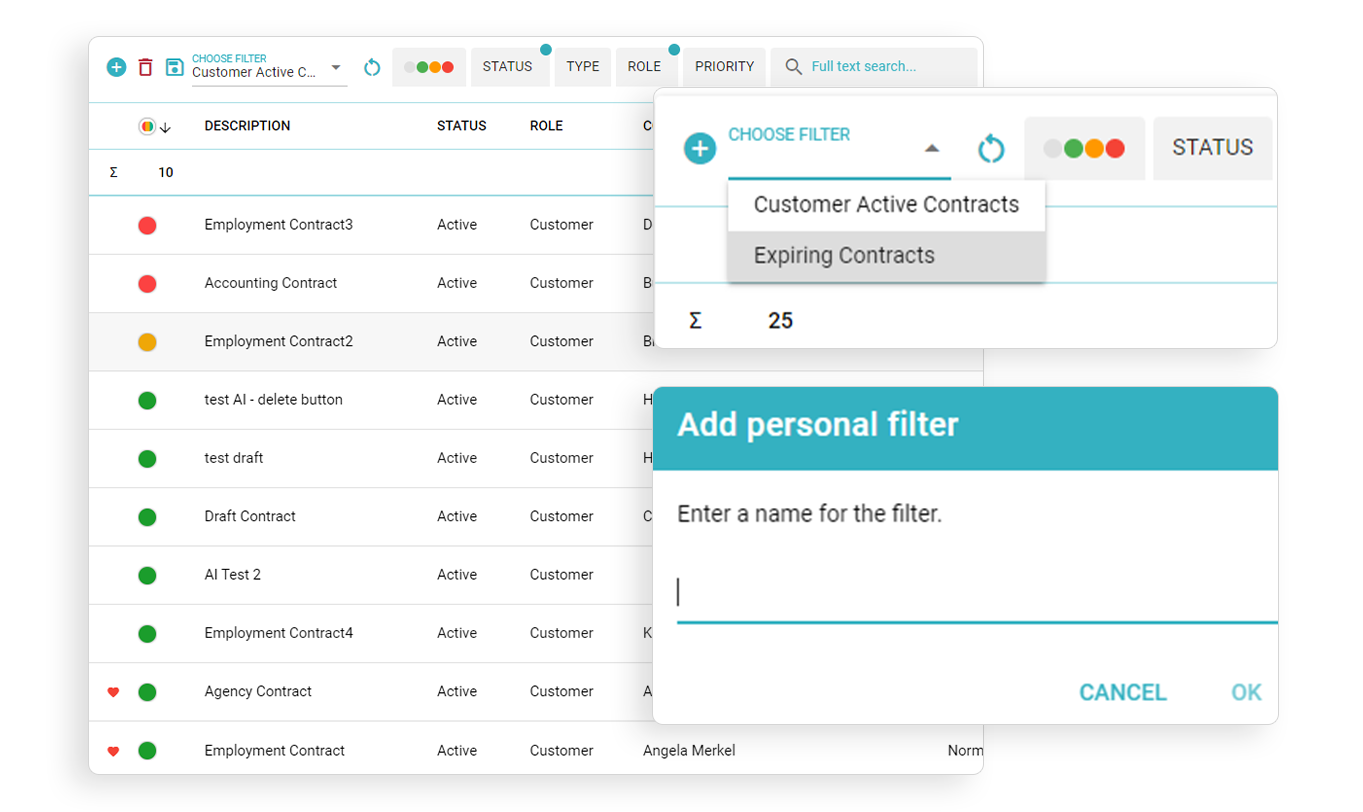
Customisable Filtering
Create and save your own filters.Filter bar
Advanced filtering and grouping via multiple-choice
Once your contracts are inside the CLM system, the next priority is visibility.
contractSILO’s Customisable Filtering feature allows users to create their own dynamic filters based on specific business needs.
For example:
-
Contracts expiring within 30 days
-
Deals above €100,000
-
Agreements tied to a specific client or vendor
-
Contracts containing auto-renewal clauses
These filters don’t just save time — they provide real-time insight into operational risks and opportunities.
Executives can save filters as dashboards and use them for reporting or renewal forecasting.
Together with Scan with AI, these filters transform static data into actionable intelligence.
Common Pitfalls During Migration — and How to Avoid Them
1- Incomplete metadata
Legacy documents may lack fields such as signature date or counterparty name.
→ Fix: contractSILO prompts users to confirm missing details after scanning.
2- Scattered files
Old contracts stored across multiple folders can make uploads messy.
→ Fix: The system automatically matches files by name and content similarity.
3- Resistance to change
Teams used to Excel might hesitate to adopt new tools.
→ Fix: contractSILO’s interface mimics a familiar spreadsheet view for smooth onboarding.
Tangible Benefits of a Smooth CLM Transition
A well-executed migration pays off within weeks:
-
Time savings: No more manual data entry or file searching.
-
Auditability: Every action is logged for accountability.
-
Financial clarity: Payment schedules and obligations are visible in one place.
-
Compliance: Full GDPR and local data protection alignment.
Ultimately, moving from Excel to CLM isn’t just a technical upgrade — it’s a strategic evolution.
Contracts become living, measurable assets that support smarter decisions and stronger governance.
Step-by-Step Migration Plan with contractSILO
1- Collect all Excel files and contracts in one location.
2- Run AI scanning.
Upload files to contractSILO and let the system extract key information.
3- Validate the data.
Review AI-identified fields, confirm or correct as needed.
4- Build your filters.
Create dashboards like “Active,” “Pending,” or “Expiring Soon.”
5- Train your teams.
Give Legal, Sales, and Finance customized dashboards for daily visibility.
The New Standard for Contract Data Management
Migrating from spreadsheets to a CLM platform is no longer optional — it’s a business imperative.
contractSILO provides the tools to make this shift seamless: AI-powered document scanning to capture data accurately, and customisable filters to surface what matters most.
This transformation reduces manual work, eliminates blind spots, and establishes a culture of transparency.
You’re not just managing documents anymore — you’re managing knowledge.
FAQ
1. Will I lose data during migration?
No. contractSILO’s AI scanning ensures that every contract field is captured and verified before import.
2. Can I upload Excel files directly?
Yes. Spreadsheet rows can be mapped to contract metadata automatically.
3. How do filters improve reporting?
You can build filters based on any field — dates, values, status — and turn them into dashboards for performance tracking.
4. Is contractSILO suitable for small businesses?
Absolutely. Its intuitive interface makes it easy for teams used to Excel.
You might also like