Work no longer happens in one building—or even one time zone. Legal, Sales, Procurement, and Finance collaborate with outside counsel, vendors, and partners who may never set foot in your office. The result is predictable: valuable contracts get copied, emailed, and parked in private folders. Visibility drops. Risk rises. And simple questions—Who can see this price? Did the supplier actually get the new SLA?—take hours to answer.
There’s a better pattern: centralize control without centralizing people. With real-time, role-based access control (RBAC) inside your Contract Lifecycle Management (CLM) system, every participant sees exactly what they should—no more, no less—wherever they are. In this article, we’ll translate RBAC from an IT acronym into a practical operating model for contract-heavy teams. You’ll learn how to design permissions at folder, contract, and clause level; how to collaborate safely with external parties; and how to prove compliance with audit-ready logs. We’ll finish with a one-day quick start and the KPIs that show progress.
What “real-time, role-based access” actually means
Role-based means access follows job responsibilities, not who shouted loudest on email. Real-time means those permissions apply immediately—when someone joins a team, changes roles, or leaves the business. Done well, RBAC becomes quiet infrastructure: it fades into the background, yet it’s the reason work moves quickly and safely.
Key design ideas:
-
Scope at multiple levels.
-
Workspace or business unit (e.g., EMEA Legal vs. Global Procurement)
-
Folder or portfolio (e.g., Supplier Contracts → Logistics)
-
Single contract (e.g., MSA with Contoso)
-
Clause/field (e.g., hide “Discount Schedule” from vendors)
-
-
Permission types: view, comment, propose redlines, approve, publish, export, administer.
-
Inheritance with exceptions: default access comes from the parent folder; sensitive records override with stricter rules.
-
Time-boxed sharing: links that expire, with optional watermarks and download blocking.
-
Event-driven updates: identity changes (via SSO/SCIM) instantly grant or remove access—no tickets, no waiting.

Contract Audit
Reach the related contract with a click.
Search and download (CSV format). Pro Version
A practical persona map (start here)
Most organizations begin with four core personas and expand as needed:
-
Legal – Full edit on templates and clause library; approve authority for non-standard terms; export for litigation holds.
-
Sales / Commercial – Create requests, fill business fields, propose redlines within guardrails; view pricing and term dates; share view-only drafts with customers.
-
Procurement / Vendor Mgmt – Own supplier agreements; see risk/compliance fields; share read-only copies with vendors; can’t see customer pricing.
-
Finance – Read commercial terms (pricing, rebates, payment schedules) and renewal/notice dates; no access to privileged legal notes.
Optional extensions: InfoSec (security addenda), Operations (SOWs), external counsel (time-boxed, read-write on assigned matters), and executive read-only dashboards.
Map these personas to role templates in your CLM. The value of templates is operational: new hires get the right access in seconds; role changes propagate instantly; auditors can read the template and understand your intent.
RBAC at folder, contract, and clause level
Folder level: Organize portfolios by business unit or contract type (e.g., Customers > EMEA Enterprise). Inherit view rights to reduce friction, then carve out sensitive subfolders (e.g., Strategic Pricing) with stricter rules.
Contract level: Assign an owner (accountable), stewards (operational), and collaborators (contributors). Owners can delegate temporary access to unblock work, with built-in expiry.
Clause/field level: The fine-grained layer that prevents oversharing. Examples:
-
Hide “Discount Schedule” and “Margin Addendum” from customer recipients.
-
Mask PII fields when sharing outside the company.
-
Allow vendors to propose changes to “Delivery Terms” but not to “Limitation of Liability.”
This granularity is how decentralized teams align: each party sees the same record, but not the same view of it.
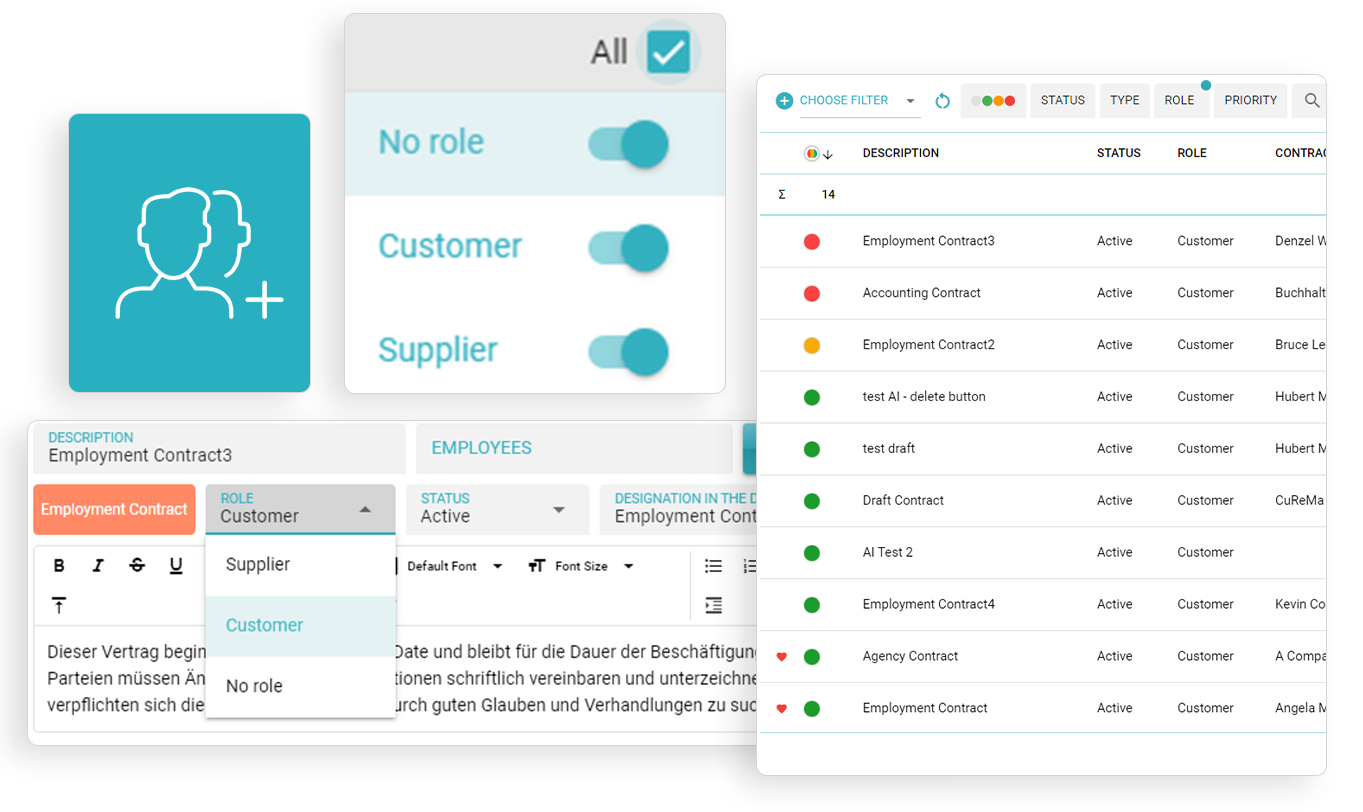
Role-Based Grouping
Easily reach related contracts based on the role.
Group and also list your "no-role" contracts.
Security layers that make RBAC resilient
RBAC is strongest with defense-in-depth:
-
SSO (SAML/OIDC) & MFA: Central identity with group-based roles; step-up authentication for high-risk actions (e.g., publishing or exporting).
-
Conditional access: IP allowlists, device posture checks, session timeouts, and geo restrictions for sensitive work.
-
Watermarked, read-only sharing: Eliminate attachment sprawl by sharing links that block downloads and mark viewers.
-
Secrets and key management: Encrypt at rest and in transit; separate keys; rotate regularly; log every privileged access.
-
Change control: Model/permission changes are versioned and auditable; you can prove who changed what and when.
Collaboration without losing the plot
Distributed work fails when people can’t tell which version is real. Your CLM should protect the “single source of truth” while enabling free-flowing collaboration.
-
Co-authoring & comments: Inline discussions with @mentions keep context attached to the record—not in chat silos.
-
Track changes that make sense: Turn redlines on for negotiation copies; capture a clean executed version as the canonical artifact.
-
External participation: Invite vendors or outside counsel into a constrained workspace: they see exactly the contracts and fields you permit, with watermarking and link expiry by default.
-
Tasks and SLAs: Assign owners and due dates for approvals, obligation reviews, and renewals; escalate automatically.
The result is speed and control: fewer emails, fewer copies, faster decisions—and a clear audit trail.
Audit-ready by design
Auditors don’t need PowerPoints; they need evidence. Real-time RBAC gives you:
-
Immutable access logs: Who viewed, edited, approved, exported, or shared, with timestamp, IP, and client details.
-
Reviewable permission history: Role changes, link creations, expiry events, and exception grants.
-
Retention & legal hold: Schedules by contract type with deletion certificates; holds that suspend deletion but keep access tight.
-
SIEM integration: Stream key events for centralized monitoring and alerts (e.g., surge in exports, access from unusual location).
When auditors ask “Who could see pricing on 14 March?” you can answer in minutes—with PDFs to prove it.
One-day quick start (yes, really)
You don’t need a six-month program to establish control. In one day you can make a visible dent:
Hour 1–2: Roles & baseline policies
-
Create role templates for Legal, Sales, Procurement, Finance, and External Collaborator.
-
Define the default: view inside your business unit; edit by request; export by exception.
Hour 3–4: Identity and groups
-
Connect SSO; map IdP groups to CLM roles.
-
Turn on MFA; enforce session timeouts and IP allowlists for admin actions.
Hour 5: Folder structure
-
Build three top-level folders (Customers, Suppliers, Corporate).
-
Create a “Sensitive” subfolder under each; restrict to need-to-know.
Hour 6: External sharing rules
-
Watermark on by default; downloads off by default; link expiry in 7–14 days.
-
Mask specific fields (PII, internal pricing) for external viewers.
Hour 7: Audit & alerts
-
Enable access-log exports; integrate with SIEM (or schedule weekly exports).
-
Create alerts for bulk exports and unusual login locations.
Hour 8: Pilot and publish
-
Onboard one Sales squad and one Procurement squad.
-
Send a one-page “How we share contracts now” guide.
-
Review the first access logs to validate your model.
By tomorrow, you’ll have fewer attachments in inboxes and a clean story for compliance: who sees what is now a policy, not a negotiation.
KPIs that prove RBAC is working
-
Time-to-access: Average minutes from user request to granted access (target: near-instant via group assignment).
-
Share-without-download adoption: % of external shares using watermarked, no-download links (target: >90%).
-
Unauthorized access incidents: Counts per quarter (target: zero).
-
Access review completion: Quarterly certification rate by folder/role (target: 100%).
-
Cycle time impact: Change in draft→approval time after RBAC rollout (target: measurable reduction driven by fewer bottlenecks).
Publish these in a monthly dashboard. RBAC should be boring—and the numbers should show it.
Case snapshot
A global distributor ran contracting across four continents with 120+ stakeholders. Before RBAC, Sales routinely exported redlines to email customers; Procurement kept supplier agreements in private drives; Finance asked Legal for copies on demand. After implementing real-time RBAC in their CLM:
-
External shares via secure links hit 96% within eight weeks; attachment emailing fell to near zero.
-
Time-to-access dropped from ~18 hours (tickets and approvals) to under 10 minutes (group assignment via SSO).
-
Quarterly access reviews reached 100% completion with one-click certifications.
-
Audit prep time for contract access questions shrank from days to hours.
Most telling: the legal team reported fewer “drive-by” requests because stakeholders could self-serve—within the boundaries the business trusted.
Common pitfalls—and how to avoid them
-
Everything is an exception. If every contract ends up in a custom permission snowflake, the system becomes unmanageable. Fix: keep 80–90% on inherited rules; reserve exceptions for genuinely sensitive records.
-
Over-permissive roles. “Everyone can export” sounds convenient until it isn’t. Fix: restrict export to a small group; give others share-without-download by default.
-
No expiry on temporary access. Temporary often becomes permanent. Fix: require expiry for exception grants and notify owners before renewal.
-
Shadow repositories. If people don’t trust access, they build side channels. Fix: make the secure way the easy way: instant access via roles, fast external sharing, clear guidance.
-
Skipping reviews. Permissions drift over time. Fix: schedule quarterly access certifications with one-click attestations and automated removals for non-responses.
How integrations strengthen control
-
SCIM provisioning: When HR updates a role, access changes automatically—no manual cleanup.
-
CRM/ERP context: Sync account ownership and region to drive default access; Finance gets read-only to commercial fields without touching legal notes.
-
E-signature: Keep execution inside the CLM; permissions follow the document from draft to signed artifact—no copies in personal drives.
-
Ticketing & chat: Expose “request access” buttons that route to approvers with the contract context attached; notify changes in the channel teams already use.
Integrations are the difference between a permission model and a permission reality.
Decentralized teams are not the problem; uncontrolled copies are. Real-time RBAC lets you keep a single, authoritative contract record while meeting every participant where they work—across time zones, companies, and devices. The payoff is tangible: faster cycles (no waiting for ad-hoc approvals), lower risk (no accidental oversharing), and cleaner audits (evidence on demand).
If you’re starting today, aim for simple, durable patterns: role templates, inherited permissions with minimal exceptions, external sharing that defaults to safe, and quarterly reviews that take minutes—not weeks. The result is a contracting engine that moves as quickly as your business, with the guardrails your risk owners require.
FAQ
1) How granular can permissions really get—can we restrict individual clauses or fields?
Yes. Mature CLM systems support clause/field-level visibility. For example, you can hide internal discount schedules from customers while allowing them to comment on delivery terms. Use this sparingly for sensitive data; most work benefits from folder/contract-level controls with occasional fine-grained exceptions.
2) We work with dozens of outside vendors and counsel. How do we stop attachment sprawl?
Adopt watermarked, read-only links with default expiry (7–14 days) and download blocking. Pair this with a simple policy: external sharing happens only via the CLM. When the secure way is faster than email, behavior changes quickly.
3) What happens when someone changes teams or leaves the company?
Connect your CLM to your identity provider (SSO/SCIM). Group membership drives access; removing a user or changing their group updates permissions in real time. Schedule quarterly access reviews to catch lingering exceptions.
4) Does RBAC slow people down when they’re under deadline?
The opposite—when designed well. Role templates and inherited rules give most people instant access. For true exceptions, use one-click, time-boxed grants that expire automatically. Measure time-to-access to ensure you’re helping, not hindering.
5) How do we prove to auditors that our model works?
Provide three artifacts: (a) role templates that define intended access; (b) immutable access logs showing who viewed/edited/exported what and when; (c) quarterly certification reports proving that owners reviewed and affirmed access. Together, they demonstrate design, operation, and oversight.
This article is informational and not legal advice. Consult counsel and your security team to tailor RBAC and data-access policies to your industry and jurisdictions.
You might also like